
(Did you miss the first part of my review? About The Tangible?)
Onto the intangible aspects of the Pixel 2 XL, which is also magical. First of all, Google doubled the warranty on each Pixel device in the wake of the screen quality controversy, so now I’m covered for 2 years just for owning the thing. Plus, Pixel owners get free unlimited high-quality photo and video storage on the cloud for that time, so all my media use zero space on my 64GB hard drive. Pixel owners are also guaranteed three years of software updates and security patches, so this is truly a device that will age like expensive wine. Hopefully the battery will too, though they tend not to, as Apple is so ready to point out.
Speaking of batteries, the Pixel 2 XL is rocking a decently sized 3520mAh battery, which easily gets me through the day. I’ve even managed to get two days from one charge, after having forgotten to charge overnight and turning on the power saving mode. Power saving mode is amazing on my device, and I haven’t seen it implemented in this way before.
My phone will show an admittedly ugly red bar on the top and bottom of the screen to tell me it’s in power saving mode. Beyond that, it speeds up animations. So, tapping Reddit just flings it open right away, instead of using more power and time to show me a cute animation of the window opening up. Even pulling down the notifications shade is different, as that’s sped up so much it takes zero time for the shade to come down. I love this. Animations are nice, but I don’t want to wait that long. Especially when I’m low on battery!
The screen dims, vibration is used much less often, location services are turned off, and apps won’t update unless you open them. I can eek out hours of extra time on my phone with the battery saving mode. There is no extreme power saving mode, but with the huge battery and efficient software I’ve yet to need it.
Speaking of things I don’t need, the Pixel 2s don’t have a headphone jack, and I’m one of those people who’s fine with that. It comes with a dongle in the box, and I’ve already made the jump to Bluetooth headphones anyway (I have the Moto Surround for when it’s rainy or when I sweat and the Sony MDR-1000X for the rest of the time).
Bluetooth is awesome on the Pixel. It’s one of the first devices to sport Bluetooth 5.0, which means it can connect to two devices at once and prioritizes Bluetooth connections. The means the connection quality and sound quality are boosted: longer range, no more stuttering or lags, and serious sound quality.
The Pixel dishes out good sound, but it also listens to you. Google Assistant is killing the game these days, and that’s likely going to stay that way. You can squeeze the Active Edge part of the phone while it’s in your hand to spawn the assistant, or you could do a bunch of other things to bring up the assistant (say “OK Google,” hold the home button, tap the voice icon, etc.). I’ll be honest, I could’ve lived without the squeeze functionality, but it is pretty cool and definitely has me using the assistant more. Activating it and speaking to Google feels like using a walkie-talkie, and that’s another playful and nostalgic thing I’m sure Ivy Ross enjoys. My issue is that I can activate Google in 4 ways, like I said. Seems overkill, but I’m also aware that it means I can customize the hell out of my phone and still have core Android functionality after.
That’s what I love most about Android: the customizability. Pixel 2s are currently rocking Android 8.1, which is as up-to-date and as customizable as it gets, since it’s Google’s OS. Every other Android manufacturer puts a skin on top to make it their own. Skins slow Android down, come with bloatware, and are slower to update. When Google releases 9.0, it’ll go to Pixels first. All the other Android manufacturers will have to tweak their skins to adapt. This usually takes months, and even close to a year (looking at you, Samsung). This isn’t just annoying, but also risky. Slower update cycles mean slower security updates.
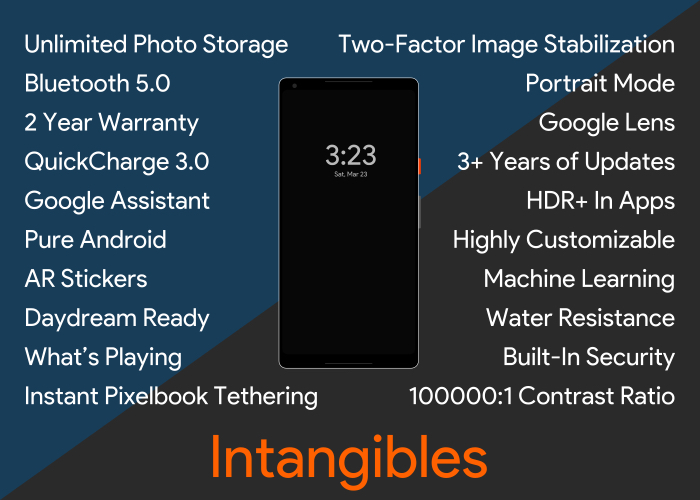
One of the new features that comes with 8.1 is better Machine Learning, which is currently Google’s favorite thing, and for good reason. ML is software teaching itself how to better work for you, based on how you use it, and Google is doing it better than anyone. That isn’t likely to change, thanks to all of us “googling” billions of things over the last two decades. They have more data than they’ll ever know what to do with, so they’re using some of it to inform and thereby improve the Android experience, via Machine Learning.
The Pixel’s main focus for ML right now is image processing, specifically in the two cameras. A lot of phones these days have three. Two on the back, one on the front. There are many reasons phone makers do this: Apple does one zoomed in lens and one regular, LG likes to have a wide-angle second lens, the list goes on. There’s a lot you can do with a whole other camera, but adding one increases price and gives the phone one more thing that can break. Google has kept the back camera a single lens and put the rest of their eggs in the ML basket. Good move, if you ask me.
Portrait Mode is a cool thing phones are starting to be able to do, and it’s basically your phone taking professional-grade portraits. It blurs the background and focuses on the subject. Seems simple enough, but there’s a lot going on to tell the phone where you end and the background begins.
Apple uses the distance between their two rear cameras to get a sense of depth and takes that to dish out one portrait. The Pixel doesn’t need two cameras to do this, since its rear camera has Dual Pixel technology, which divides the pixels in the singular 12.2MP camera and use that microscopic distance. The rest is done with ML.
The results are astounding. And since it’s software-based, it’ll only improve as you continue to use the phone. You can also get decent portraits from the selfie camera, which isn’t available anywhere else.
Finally, video. The back camera has optical and electronic image stabilization, which means the camera both physically moves around in its housing to stabilize videos while you shoot and uses software to stabilize the video after you shoot. The result is buttery-smooth and stable video, no tripod necessary. It’s difficult to take a bad picture or video on this phone. Really difficult.
To sum it up, the Pixel 2 and 2 XL are pretty little toys on the outside, with crazy power and unlimited potential on the inside. They aren’t perfect, but Google is certainly getting closer on its second try than most other phone companies are doing on their tenth or twelfth tries. My money is on Google and Ivy Ross for the next five to ten years.
Verdict: 9.5/10, buy the damn thing.
 Thou Art